Article by Dragoș Burnescu, O365 L2 Engineer
An employee forgets a password. It happens dozens of times a day in a large organisation. Multiply that by ten different applications, each with its own password, and you have an IT department spending hours on resets instead of doing actual security work.
This is where single sign-on comes in. One authentication gives the user access to the applications they need, provided those applications are integrated with the central identity system.
Single sign-on (SSO) is a mechanism that allows a user to authenticate once with a central identity provider and then access multiple applications without re-entering their password for each one.
It sounds like a simplification, and to a point, it is. Centralising access reduces friction, but it also concentrates risk in one place.
NIS2 does not explicitly require SSO. It does, however, require access-control policies and, where appropriate, multi-factor authentication or continuous authentication solutions. SSO therefore becomes a governance decision, not simply a technical choice. EUR-Lex
The real challenge is how to gain the convenience without turning the identity provider into a single point of failure. Single sign-on centralises access through an identity provider, making that provider a critical asset that needs to be protected.
What SSO means and what it should not be confused with
Identity terminology often gets mixed together, even among professionals. SSO, IAM, federation, provisioning. They may sound interchangeable, but they solve different problems.
Clarifying the distinction is not semantics for the sake of it. Each concept addresses a different part of identity security.
SSO, IAM and identity federation
SSO addresses the authentication experience: one sign-in, multiple applications.
Identity and Access Management, or IAM, is the broader framework governing the entire lifecycle of a digital identity, from account creation through to deletion.
Identity federation goes beyond the boundaries of a single organisation or identity domain, allowing an identity from one system to be recognised and trusted by another.
In practical terms, SSO is a capability, IAM is the broader system that governs identity and access, and federation is the mechanism that extends trust between domains.

A central identity hub connects the organisation’s applications and services, simplifying identity access and control from one point.
Provisioning, deprovisioning and orphaned accounts
A new account does not simply appear. Someone creates it, assigns permissions and connects it to the appropriate groups. That is provisioning. The reverse process, deprovisioning, takes place when someone leaves the organisation and their account should be disabled.
This is where a common problem appears: orphaned accounts. The employee left six months ago, but their account is still active somewhere in an application that was never connected to the central identity lifecycle.
Centralised revocation helps, but it needs to be described carefully. It can automate or accelerate access removal, but its effectiveness depends on how well each application is integrated and on how long active sessions remain valid.
If a legacy application does not communicate with the identity provider, disabling the user centrally may not affect that application at all.
Automated provisioning through standards such as SCIM reduces this risk, but it does not eliminate it completely.
RBAC and authorisation logic
Authentication confirms who you are. Authorisation decides what you are allowed to do.
Role-Based Access Control, or RBAC, associates permissions with a person’s role rather than managing every permission individually. An accountant receives access associated with the “Finance” role rather than a manually maintained personal list of rights.
This is cleaner and easier to audit, but it has a catch: a misconfigured group can extend access far beyond what was intended without anyone noticing immediately.
The protocols behind it: SAML, OAuth and OpenID Connect
SSO does not work by magic. Standardised protocols operate behind the scenes.
SAML 2.0 is the traditional protocol still widely used for enterprise federation. OAuth 2.0 deals with authorisation – delegating access without sharing a password. OpenID Connect adds an identity and authentication layer on top of OAuth 2.0.
We will not go into their technical configuration here because this article is about governance rather than implementation.
What matters is that protocol choice affects which applications can be integrated, how authentication and authorisation are handled and how the trust relationship is established.
What does the organisation actually gain from SSO?
The benefits of SSO are easy to sell in a presentation. In practice, each one comes with a limitation worth understanding before deployment.
| Benefit | Mechanism | Limitation |
| Fewer passwords | Central authentication, one identity | The identity provider becomes critical |
| Fewer password-reset tickets | Password policies managed centrally | Does not eliminate every access-related issue |
| Faster access revocation | Direct application integration | Legacy applications may remain independent |
| Better visibility | Central authentication and access logs | Logs still need to be actively monitored |
| More consistent role-based access | RBAC and security groups | Misconfigured groups can expand access |
Notice the pattern. Every benefit comes with a “yes, but”. SSO reduces the number of passwords, but makes the identity provider indispensable. It creates visibility through centralised logs, but logs that nobody monitors are simply data occupying storage.
The benefit becomes real only when the limitation is actively managed rather than ignored. One point of honesty: I am not going to claim that employees use “dozens of applications on average”, because I do not have a sufficiently reliable universal source for that number.
What we can safely say is that SaaS adoption has increased the number of external applications organisations depend on, and every application operating its own independent authentication model creates another identity surface that needs to be managed.
Strong authentication: not all MFA is equal
A lot of organisations treat “we have MFA” as equivalent to “we are protected”. Reality is more nuanced. Some forms of multi-factor authentication are substantially more resistant to modern attacks than others.
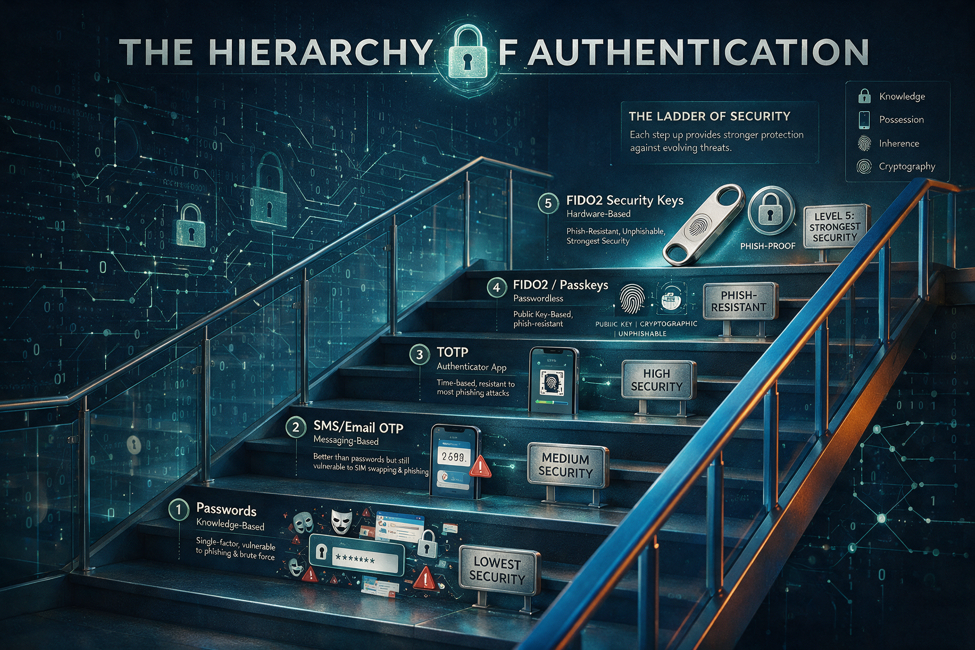
Authentication methods differ significantly in their resistance to phishing; SMS-based MFA and cryptographic authentication do not provide the same level of protection.
A hierarchy of authentication protection
Think about authentication protection as a spectrum rather than an on/off switch:
- password only – the weakest level;
- SMS-based MFA or a code received by phone;
- MFA using an authenticator application or suitable hardware token;
- cryptographic authentication based on certificates or cryptographic authenticators;
- FIDO2 and passkeys designed to provide phishing-resistant authentication.
This is a simplified operational hierarchy rather than a formal regulatory ranking. The exact assurance provided by a method depends on how it is implemented.
Why SMS is no longer sufficient for sensitive accounts
SMS represented a major improvement over password-only authentication. It also has known weaknesses.
SIM-swap attacks can allow an attacker to take control of a victim’s phone number and receive messages intended for that person. SMS-based methods also do not provide the same phishing resistance as cryptographic authentication.
For lower-risk scenarios, SMS MFA may still be preferable to having no second factor. For administrators and other sensitive accounts, however, organisations should generally look towards stronger authentication methods.
There is another distinction that is often missed: an OTP that the user manually enters is not considered phishing-resistant authentication under NIST’s current digital identity guidance. If an attacker can persuade the user to type the code into a fraudulent site, it can potentially be relayed.
NIST defines phishing resistance around cryptographic mechanisms that prevent authenticator secrets or valid outputs from being presented to an impostor verifier.
Methods such as FIDO2/WebAuthn can provide this type of protection because authentication is cryptographically bound to the legitimate service rather than relying on the user to recognise a fake page.
Conditional Access and authentication intent
Strong authentication is not only about the factor itself. Context matters. Conditional Access can evaluate signals such as location, device state, user or sign-in risk and other conditions before granting access.
A sign-in from a managed device under normal conditions may be allowed with less friction. A login attempt from an unfamiliar device or location, combined with other risk indicators, can trigger additional verification or be blocked.
Another phenomenon that needs to be considered is MFA fatigue. An attacker repeatedly sends approval requests until the user, distracted or frustrated, approves one.
Mechanisms such as number matching help confirm authentication intent because the user has to interact with information from the actual login attempt rather than simply press an “Approve” button. For particularly sensitive environments, phishing-resistant cryptographic authentication and hardware-backed security keys may provide a stronger level of assurance.
About AAL levels
NIST defines Authentication Assurance Levels, known as AALs, in the current NIST SP 800-63-4 Digital Identity Guidelines, published in July 2025. AALs provide a common language for discussing the strength of an authentication process.
At a high level, AAL1 provides basic assurance, AAL2 requires multi-factor authentication and AAL3 requires phishing-resistant cryptographic authentication using a non-exportable private key.
One point is important here: AAL is a NIST technical framework that can be useful as a reference. NIS2 does not require organisations to implement a named NIST AAL level.
NIS2 requires appropriate cybersecurity risk-management measures, including multi-factor authentication or continuous authentication where appropriate. AAL can help security teams translate the idea of “appropriate authentication strength” into concrete technical decisions, but it is not itself a NIS2 compliance level. EUR-Lex
Privileged accounts: where SSO concentrates the most risk
An administrator is not an ordinary user. They hold keys to some of the organisation’s most important systems. That makes their account disproportionately valuable to an attacker. Compromising a standard user account is a security incident. Compromising a highly privileged administrator account can become a much larger one.

An administrator account is a high-value target; just-in-time access reduces the period during which privileges can be exploited.
Permanent access versus temporary access
The traditional model gave administrators permanent rights. You are an administrator, therefore you remain an administrator all the time. The problem is obvious: an account with standing privilege is a permanent target.
Modern privileged-access models replace permanent privilege, where practical, with temporary access granted when needed and automatically removed afterwards.
This is the principle behind just-in-time access. When elevated privileges exist only during the period in which they are actually required, the exposure window is reduced.
Microsoft Entra Privileged Identity Management, for example, supports time-based and approval-based activation of privileged roles and just-in-time administrative access.
Administrative account hygiene
A few rules sound obvious, but are still regularly violated in practice:
- administrative accounts should not be used for everyday activities such as reading email or general browsing;
- elevated privileges should expire automatically rather than remain active indefinitely;
- administrative activity should be logged and attributable to the real person behind the account;
- privileged access should be reviewed separately from standard access and generally more frequently;
- administrative actions should be attributable to an individual rather than a generic shared account.
For organisations using the Microsoft ecosystem, services such as Microsoft Entra ID, Conditional Access and Microsoft Entra Privileged Identity Management (PIM) can support these principles.
I mention them as technical examples for organisations already operating on Microsoft technologies, not as mandatory NIS2 products. The directive requires organisations to manage the risk and control access appropriately; it does not prescribe a particular vendor.
When the identity provider goes down: SSO as a single point of failure
This is the scenario that keeps CISOs awake. Everything has been centralised through SSO. The identity provider becomes unavailable. Users can no longer authenticate to the applications that depend on it. The same centralisation that brought convenience can suddenly become a critical availability dependency.

Identity-provider resilience is built through redundancy, recovery architecture and tightly controlled emergency-access accounts.
Three different scenarios, three different responses
“The identity provider has a problem” is not one scenario. There are at least three distinct situations, and each requires a different response:
- The IdP is unavailable, with no indication of compromise. This is an availability problem. The response is about continuity: redundancy, failover and emergency access.
- The IdP is compromised, potentially affecting multiple applications. This is a security problem. The response may include containment, investigation and session or credential revocation.
- Connectivity between the application and IdP is lost. This is a network or integration problem. The response depends on architecture, routing and any alternative authentication path that has been deliberately designed.
How to build resilience
Protection against identity-provider failure has several layers. Redundancy and failover are intended to prevent one component failure from stopping the entire authentication process. A multi-region architecture, where supported and justified by risk, can reduce geographic dependency.
In hybrid architectures, carefully designed fallback mechanisms may maintain access to some services when a cloud component is unavailable. Emergency-access – often called “break-glass” – accounts provide a controlled administrative path when normal identity mechanisms cannot be used.
Microsoft, for example, recommends maintaining dedicated cloud-only emergency-access accounts for Microsoft Entra environments and generating high-priority alerts whenever those accounts are used. This is not a tutorial on how to configure a break-glass account.
The governance principles matter more here: emergency accounts should be separated from the normal authentication path, strongly protected, closely controlled and monitored. Their use outside a declared or legitimate emergency should itself generate attention. And just as importantly, recovery procedures must be tested. An untested continuity plan is still only a document.
Dependency on a single cloud provider
If your identity provider and much of your wider infrastructure sit with the same cloud provider, there is a concentration risk.
A sufficiently large provider outage could affect both authentication and the applications users are trying to reach. That does not mean organisations must avoid single-provider strategies at any cost.
It means the dependency needs to be explicitly understood, assessed and managed rather than ignored because “it has always worked so far”.
How SSO relates to NIS2 requirements
NIS2 does not mention SSO by name. It does, however, require measures that a well-governed SSO architecture can support. The relationship is indirect, but real.
| Measure | Objective |
| Access control | Limit unauthorised access to systems |
| MFA and continuous authentication | Reduce the risk of identity misuse |
| Logging | Support incident detection and investigation |
| Privilege reviews | Apply least-privilege principles |
| Resilience | Support continuity of essential services |
| Supplier assessment | Reduce supply-chain and third-party risk |
What Article 21 says
Article 21 of the NIS2 Directive includes policies and procedures regarding access control and asset management among the cybersecurity risk-management measures organisations need to address.
It also refers to the use of multi-factor authentication or continuous authentication solutions, where appropriate. SSO is one possible implementation approach that can support these objectives. It is not an explicit requirement.
An organisation can meet NIS2 access-control requirements without implementing SSO if it has another effective way of governing identities and access.
SSO becomes attractive because it centralises control and can make policies easier to enforce consistently, not because the directive mandates a specific authentication architecture.
European regulatory context
For an EMEA audience, the legal scope needs one important qualification.
NIS2 is an EU directive. EU Member States have transposed, or are required to transpose, its requirements into national law, and organisations need to consider the rules and supervisory procedures that apply in the relevant Member State.
For certain types of entities – including cloud computing service providers, data centre providers, managed service providers, managed security service providers and several other digital-sector providers – Commission Implementing Regulation (EU) 2024/2690 provides more detailed technical and methodological requirements at EU level.
The regulation includes detailed access-control and authentication requirements, including the use of state-of-the-art authentication methods based on assessed risk and multi-factor or continuous authentication where appropriate.
For organisations outside the EU but operating across EMEA, the identity-governance principles discussed here remain relevant, but NIS2 applicability must be assessed separately based on the organisation’s EU operations and the applicable national legislation.
This article remains operational rather than legal guidance.
Monitoring, attack signals and incident reporting
Authentication logs are extremely valuable for attack detection, with one condition: someone has to look at them. An identity provider generating detailed logs that nobody monitors provides visibility only on paper.
SIEM and SOAR integration
Identity-provider logs should normally feed into a SIEM or equivalent security-monitoring capability, where events can be centralised and correlated with other signals.
Where security automation is mature enough, SOAR capabilities can trigger predefined responses to certain conditions, such as escalating or restricting a suspicious account. This turns logs from passive archive material into an active detection capability.
Signals worth investigating
Some identity-related patterns deserve closer attention:
- password spraying – trying the same or similar passwords across many accounts;
- sign-ins from locations that appear impossible to reconcile within the available time, often described as “impossible travel”;
- unusual group-membership changes;
- sudden privilege escalation;
- use of an emergency or break-glass account;
- changes to federation configuration;
- attempts to take over authenticated sessions through session hijacking.
One important point: these are signals for investigation, not automatic confirmation that an attack has taken place. An apparent impossible-travel event may be caused by a VPN or other legitimate networking behaviour. The purpose of the signal is to direct an analyst’s attention, not automatically declare an incident.
Incident-reporting timelines under NIS2
For entities subject to NIS2, Article 23 establishes a staged notification process for significant incidents.
At EU-directive level, this includes an early warning without undue delay and in any event within 24 hours of becoming aware of the significant incident, an incident notification within 72 hours, and a final report generally within one month after the incident notification. National authorities may also request intermediate reporting, and the applicable national transposition should always be checked. Identity logs can help determine what happened and assess the scope of an incident. They do not replace the organisation’s process for determining whether an event meets the threshold for a significant incident or for handling the associated regulatory reporting. The data tells you what happened. The organisation still has to make the classification and reporting decisions.
Demonstrable controls: the difference between policy and reality
This is one of the most common compliance traps. A well-written policy does not prove that the control exists in practice. A regulator, auditor or customer performing assurance work may need evidence that the policy is reflected in the systems.
ENISA’s technical implementation guidance for the NIS2 Implementing Regulation follows exactly this logic: it describes control requirements and provides examples of evidence that can demonstrate implementation.
Four layers that need to align
Between intention and reality there are several layers, and they do not automatically match:
- the declared policy – what you say you do;
- the actual configuration – what is really configured in the systems;
- effective access – who can actually access what;
- system-generated evidence – what you can demonstrate during an audit, assessment or regulatory review.
The classic example is a policy requiring MFA for every administrator. It sounds good. The real verification needs to determine whether MFA is actually enforced in the configuration and, more importantly, whether exceptions have accumulated over time.
One administrator temporarily excluded a year ago and never brought back under the policy may be the gap through which an attacker enters. The difference between what the document says and what the system actually does is often where risk becomes visible.
From annual checks to continuous monitoring
Many organisations treat configuration reviews as a pre-audit ritual. Once a year, shortly before the assessment, someone checks the settings. The problem is that the environment keeps changing during the other eleven months. Exceptions are added. Groups change. New accounts appear.
Periodic or continuous configuration monitoring provides a more current view of what is actually happening instead of discovering drift months later.
How Security OptiApp can help
For organisations trying to reduce the gap between declared policy and actual technical posture, a platform such as Security OptiApp can help bring configuration findings and evidence into the same working context.
Its practical role is to make the difference between “what we say we do” and “what is actually configured” easier to identify and track, rather than leaving that discovery until the next audit or assessment.
Where the relevant integrations and capabilities are enabled for the deployed version, identity and access information from environments such as Microsoft Entra ID, Conditional Access, MFA and Microsoft Entra PIM can contribute technical evidence when assessing whether access policies are actually being enforced and where exceptions exist.
One limitation should be stated clearly: Security OptiApp is not a formal audit, certification or guarantee of NIS2 compliance.
Its role is to improve visibility, organise evidence and support remediation work, not replace an independent assessment or the organisation’s legal and governance responsibilities.
Learn more about Security OptiApp.
Single sign-on is neither a cure-all nor a trap. It is a governance decision. Managed well, it reduces friction and makes access control more consistent and easier to demonstrate. Managed badly, it concentrates risk in exactly the place an attacker would want to compromise. The difference is not SSO itself. It is how the organisation manages privileged accounts, authentication strength, identity-provider resilience and the gap between policy and technical reality. Centralising access is worth the effort only when resilience and demonstrable controls come with it.
Frequently asked questions about single sign-on and NIS2
What is single sign-on?
Single sign-on is a mechanism that allows a user to authenticate once with a central identity provider and access multiple integrated applications without re-entering their password for each application.
Is SSO mandatory under NIS2?
No. NIS2 requires appropriate access-control measures and, where appropriate, multi-factor authentication or continuous authentication. SSO is one implementation option that can support those requirements; it is not an explicit NIS2 obligation.
What is the difference between SSO and MFA?
SSO addresses the authentication experience: one sign-in can provide access to multiple integrated applications. MFA adds additional factors to verify identity. The two technologies complement one another rather than compete.
Why is SMS MFA not sufficient for administrator accounts?
SMS-based authentication does not provide the same resistance to phishing and account-takeover techniques as phishing-resistant cryptographic authentication. For highly privileged accounts, stronger methods such as FIDO2/WebAuthn security keys or appropriately implemented passkeys should be considered based on risk.
What are orphaned accounts?
Orphaned accounts are accounts that remain active after the person associated with them has left the organisation or no longer requires access. They commonly exist in applications that are not properly integrated with central provisioning and deprovisioning processes.
What is a break-glass account?
A break-glass or emergency-access account is a tightly controlled administrative account intended for situations where normal authentication or administrative access is unavailable. It should be independently accessible, strongly protected and closely monitored.
What happens if the identity provider goes down?
If the architecture has no appropriate resilience or fallback mechanisms, users may lose access to applications that depend on the identity provider. This is why identity architecture should consider redundancy, recovery, emergency administrative access and tested continuity procedures.
What is just-in-time access for privileged accounts?
Just-in-time access provides elevated privileges temporarily, when they are required, rather than leaving them permanently assigned. The privilege expires after the defined period or task, reducing the time during which an administrator account carries elevated rights.
What are the NIS2 incident-reporting deadlines?
At directive level, significant incidents are subject to a staged process including an early warning within 24 hours, an incident notification within 72 hours and a final report generally within one month after the incident notification. National implementation and sector-specific requirements should also be checked.
Why is a written policy not sufficient for compliance?
Because the organisation needs to be able to demonstrate that the control described in the policy is actually implemented. Configuration, effective access and supporting evidence need to align with the documented policy.
About the Optimizor Team
Optimizor provides consulting and managed IT services for organisations with hybrid infrastructures, with expertise in cybersecurity, identity governance, NIS2 readiness and the Microsoft ecosystem. Optimizor holds ISO 20000-1 and ISO 9001 certifications and develops Security OptiApp, a platform designed to support security-posture assessment, evidence management and remediation activities. The analysis in this article is based on primary public sources and the team’s operational experience. It is not legal advice, and specific legal obligations should always be checked against the NIS2 national transposition and applicable sector-specific rules in the relevant jurisdiction.
Sources
- Directive (EU) 2022/2555 (NIS2), particularly Article 21 on cybersecurity risk-management measures and Article 23 on reporting obligations. European Parliament and Council of the European Union, 2022. EUR-Lex
- Commission Implementing Regulation (EU) 2024/2690, technical and methodological cybersecurity risk-management requirements for specified digital, infrastructure and ICT-service entities. European Commission, 2024. EUR-Lex
- NIST SP 800-63-4, Digital Identity Guidelines, including Authentication Assurance Levels and phishing-resistant authentication. National Institute of Standards and Technology, July 2025. NIST Computer Security Resource Center
- ENISA NIS2 Technical Implementation Guidance, access control, authentication and examples of implementation evidence. European Union Agency for Cybersecurity, 2025. ENISA
- ENISA Threat Landscape 2026, European Union Agency for Cybersecurity, September 2026. ENISA
- Microsoft Entra documentation on Privileged Identity Management and emergency-access accounts, for the Microsoft-specific implementation examples used in the article.